
Access DOCX file with BeautifulSoup
Beautiful Soup is a Python library that allows for easy parsing and navigation of HTML and XML documents. It is often used for web scraping and data extraction, as well as for modifying and creating HTML and XML files. In this post, we will explore how to use Beautiful Soup to read and write Microsoft Word documents.
DOCX format
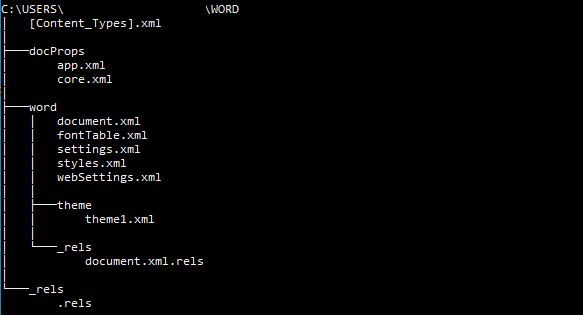
Microsoft Word documents are stored in a proprietary format called .docx. However, the .docx format is actually just a collection of compressed XML files.
zipfile library
The main document content is stored in the file “word/document.xml”. By using the zipfile library in Python, we can extract the contents of a .docx file and access the XML files within it.
#open docx with zipfile
with zipfile.ZipFile('Word.docx', 'r') as zip:
    doc = zip.read('word/document.xml')
Parse XML with BeautifulSoup
Once we have extracted the XML files from the .docx file, we can use BeautifulSoup to parse the “word/document.xml” file and extract elements from it.
# parse xml
soup = BeautifulSoup(doc,'xml')

# find body
body = soup.find('body')

# print lines
for line in body.find_all('w:p'):
    print(line.get_text())
In addition to the extraction functionality covered in the previous sections, BeautifulSoup also has more advanced features that can be useful when working
with XML file such as edit structure, tag, and strings. Once edit the XML data, we can simply create new docx file form it using the zipfile.